Many people think that RGBA only used with image pixel information and to define the color of an image. But
idea of RGBA can be used to hold masks, depth values, xyz and some other things. when render out form 3D software, in case that it needed some masks for the objects in the scene so it will be easy later to edit in compositing software, use RGBA to hold these masks by assigning these colors to the objects then render it out as a normal image. (red, green, blue, black, white) (be sure not to assign same color to object next to each other). also RGBA can hold XYZ values, which can be very helpful in compositing software. can be use in color correction, relighting, position 2D object in relation the 3D object...so on.
Monday, February 27, 2012

Tuesday, February 21, 2012
Things to be considered when integrating CG with Live Action
These are some of the things :
- Light: Direction - intensity - over all color - source count
- Shadows: Direction - Color - Strength - Soft\sharp - contact shadow
- Reflection: Strength - over all color - the distortion
- Matching: White & Black Point
Depth of Feild
Grain
Camera Destortion
Color Feel
Monday, February 20, 2012
The 80/20 Rule
The 80/20 Rule is :
Finish 80% of the work (shot \ animation \ Vfx \ anything ) in 20% of Time. But
In 80% left of time Finish the 20% left of the work (this 20% is what give the work the Wow, The Likeness, the acceptance)
Finish 80% of the work (shot \ animation \ Vfx \ anything ) in 20% of Time. But
In 80% left of time Finish the 20% left of the work (this 20% is what give the work the Wow, The Likeness, the acceptance)
Camera shake
One of the ways to make a CG shot look reel is to add randomness and irregularities.
For Example: Camera shake. not always the camera should be smooth, sometime a bit of mistake or shake add the extra touch.
For Example: Camera shake. not always the camera should be smooth, sometime a bit of mistake or shake add the extra touch.
Friday, February 17, 2012
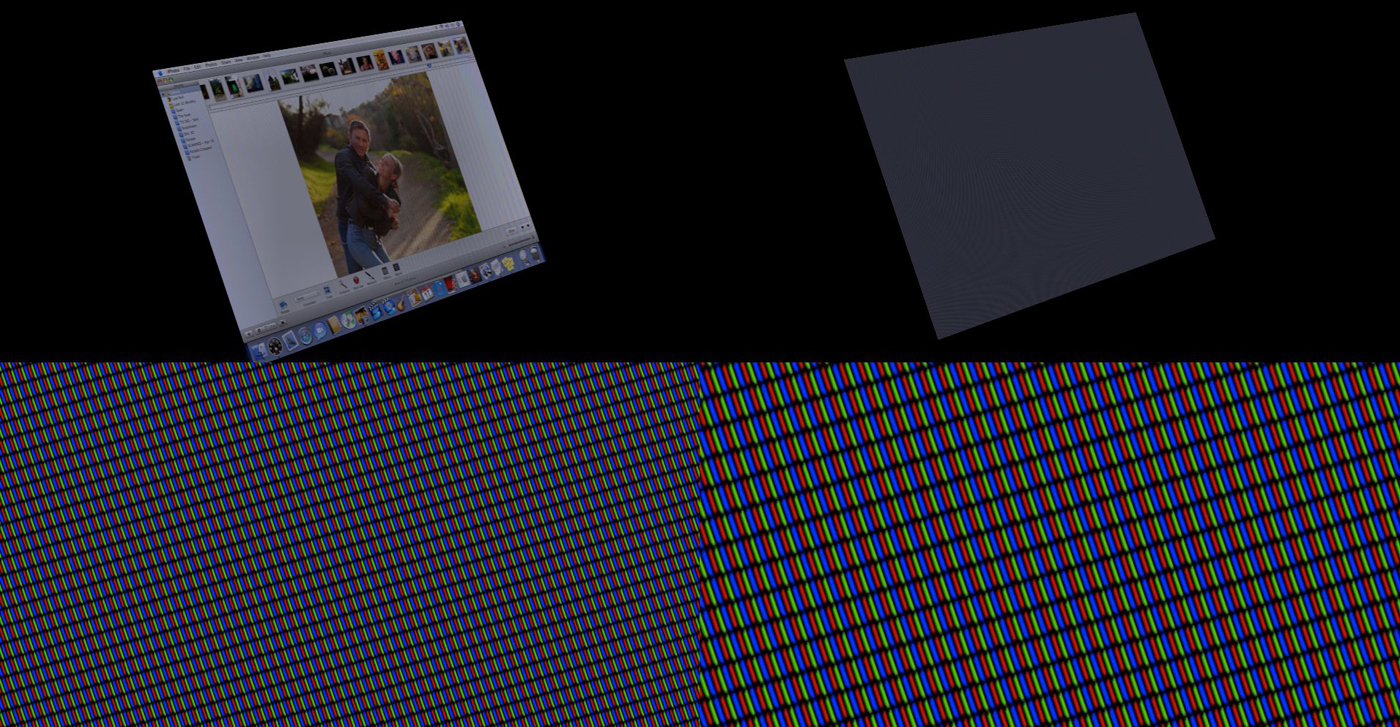
Realistic monitor replacing
"A nice way to give realistic to monitor replacing is to rebuild all the pixels and flicker as the reel monitor will have while shooting it.then comp it over whatever image you want to replace the screen with." A note from an Interview in (The Art of VFX)... you can read the full article over HERE

Thursday, February 16, 2012
NUKE Render Every other

2D Motion Vector Pass
If Happen that you Found that your render passes not align with each other in case you have the 2D Motion Vector Pass rendered in same layer as some passes. that because 2D Motion Vector Pass will make time offset to calculated its data so any other pass render in same as 2D MV pass will have the offset.(If you render 2D Motion Vector Pass in separate layer, you may not have much problem)
So one solution when it is necessary to have it with other passes, is to have it in each render layer (Sound A lot). let's assume that you wont to render AO pass in different layer than the other passes. ( let's say you have now 2 render layer), have 2D Motion Vector Pass in both layers.
So one solution when it is necessary to have it with other passes, is to have it in each render layer (Sound A lot). let's assume that you wont to render AO pass in different layer than the other passes. ( let's say you have now 2 render layer), have 2D Motion Vector Pass in both layers.
Subscribe to:
Posts (Atom)